Arena of Info on Latest Technologies, New Sites, Software's, Upgrades, Reviews, Tutorials, What, How and handy solutions. Keep visiting for Latest updates or subscribe to Email post and be up to date on latest happenings.
Sponsered
Saturday
How to watch ICC World Cup live for free
Sunday
How To Check Radiation Levels Of Your Mobile
If it is less than 1.6 watt/kg, its fine.
If it's more please dispose ur cell phone.
If it does not display after dialling *#07# then definitely dispose it because cheap phones may not display.
Only branded phones satisfy the norms. Therfore, save ur self and save others around u from the unwanted radiation from these cheap phones.
How to increase low RAM in budget android phones
But there are options and various softwares available in Playstore to increase your RAM size by creating virtual RAM in your SDCard.
Simply download following two softwares to increase RAM in your android phone:-
Second Software is - Swapper2
Steps for increasing RAM
Run Swapper for Root after installing it.
Click on Active Swap on boot.
Set swap file partition to - "SD Card FAT Partition"
Enter "512" or "256" or the size you want in swap file size(in MB).
Click Save
Note - It will take few minutes depending upon the swap size.
After that Run Swapper2
Click on ads off.
Go to settings.
Check "Run swapper at startup"
Go to swap place and change it to "/sdcard/swap.swp".
Click on swap size and choose 256 Mb
Select swappiness and set it to 100.
Check the boxes "Safe Unmount" and "Safe Remount".
Go to "Advanced Prefrences"
Check the box "Reformat swap".
Go back to main screen .
Click "ON" Button.
Wait for some time till it shows "All Done!"
Now you are done enjoy applications which needs more RAM
All the best.
Note - Methods mentioned above may corrupt your card or android OS. We are not held responsible for anything happen to your phone. You are at your own risk.
Wednesday
How to play *.mkv files?
c.) Matroska Players for different operating system can be downloaded from here.
Sunday
How to join or merge avi.001, avi.002 etc?
Best File Splitters & Mergers
1.) File Joiner - File Joiner is a simplest application to combine splitted files with extensions: .001, .002, .003, etc. back into one file. More on File Joiner:-
Official Site - Visit
Features - Here
Download - How to download File Joiner - Visit this section
2.) HJSplit - It is a most popular software available for free to join and split big files. More on HJSpilt:-
Official Site - Visit
Features - Here
Download - How to download HJSplitter - Visit this section.
Monday
Aakash or Ubislate7 Tablet
Wednesday
How to open blocked website at office, college or any where else?
How to open blocked websites?
Solution is Proxy websites.
There are various free web-based anonymous proxy services, which allows anyone to surf the web with privacy and security. There is no software to install, and it is completely free. You can surf websites but hackers or website owners cannot identify or track you. The service hides your IP address, and it prevents monitoring of your network traffic.
Few Proxy Sites are as given below:-
Sunday
Intel Insider - HD Quality Movies Online
Intel has come up with a solution. So no need to go anywhere.
Intel has launched Intel Insider in India few days back.
Intel Insider is a new hardware feature from Intel for its 2nd generatton computers .
Tuesday
Microsoft's New Internet Explorer 9 (IE9)
It will work only with Microsoft's latest operating system, Windows 7.
Wednesday
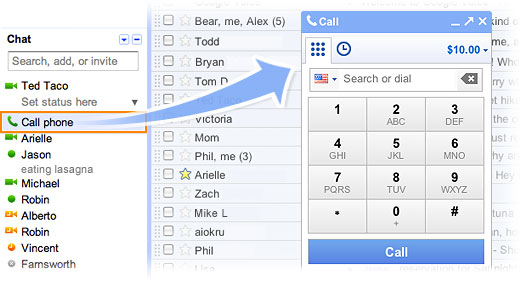
Google unveils free pc to phone calls in US and Canada
There are so many companies providing PC to phone call services but now the good news is that from today google has launched its free pc to phone call for US and Canada for the rest of the year atleast.
So big challenge for key players like Skype etc.
Calls to other countries are also very cheap. Check out the rates here.
Calls to the U.K., France, Germany, China, Japan—and many more countries— are as little as $0.02 per minute.
Dial pad is very much like a normal phone dial pad. Now there is one more option in your chat list as shown below:-
Click there and then dial pad will come up and then dial as usual.
You will also be able to receive calls on your PC if you take a free phone number from Google.
Presently this feature is rolled out for US based Gmail users. There may be a possibility that you may require to install the voice and video plug-in if you haven't already.
Official details are here.
Sunday
How to extract audio from DVD video?
There are many softwares available on the net for Ripping and extracting audio from DVD video.
Now extract your favourite audio from the video available with you and do whatever you want to like play it in your ipod, make cd of your favourite audios etc.
Here are two most commonly used and preferred:-
1.) DVD Audio Extractor - Developed by Computer Application Studio, it is a powerful software DVD audio extracting / ripping tool. It can help you to extract audio streams from your favorite DVD-Audio and DVD-Video discs and save them as OGG, MP3, Wave or FLAC files.
Features of DVD Audio Extractor are:-
Easy-to-use interface
Ultra-fast extracting speed
Rich audio formats support
Multi-channel capability
Resample to arbitrary sample rate and more
More Features
Download it from here
2.)Xilisoft DVD Audio Ripper - Developed by Xilisoft, an award-winning supplier in video and audio converting software field. With Xilisoft DVD Audio Ripper you can even choose which segments to extract. It also has a built-in player to preview your selection and you can even take a snapshot of a certain scene.
It will maintain the high quality of extracted audios.
Other features are:-
Rip DVD audio.
Convert to MP3, WMA, WAV, M4A, AAC, AC3, and OGG
Customizable audio settings before conversion
Built-in movie player
For More Features and downloading it do visit here.
Download it from Here.
I hope you have found it very usefull.
Some other tools that may interest you are:-
1. Codecs for Media Players
2. Video Converter for IPOD, PSP, Mobile, Computer format
3. Voice operated Media Player
Air and Road Distance Calculator
Bing has come up with a new distance calculator application to find air and ground distance between the two places in a very simple way.
Here I will tell you how to use that application in a very simple way:-
Go to Bing and select Distance Calculator Application, which will give you a distance between two places on the Bing Map.
First of all enter the name of the place and add it. You will find it in your places option below the input box.
Then, select another location from the disambiguation box.
You will also find the flag placed at your inputted locations. You can also drag the flag to the required location for exact and refined results. As soon as you add second location it will give you the Distance between two locations.
You will find two icons one with Aeroplane giving you Distance in Air miles other one of Car or Bus giving you Distance in miles or Kms depending upon your preference selection.
Watch this video for more idea on this application:- Courtsey Youtube
For more applications available in Bing Maps just visit their explorer section here
You may like other Calculators in my blog like Area Conversion Calculator and other converters so don't forgot to visit Converter Section in this blog Here
How to see private photo albums of others in Facebook
Just paste this script in address bar after reaching the profile page of particular person:-
javascript:(function(){CSS.removeClass(document.body,%20'profile_two_coLUMNS');tab_controller.changePage("photos");})()
This is applicable only to those albums which that person has shared anytime earlier with others as default.
How to safeguard your account?
So to prevent yourself from such type of hacks just go to privacy settings of your facebook account and set privacy settings of all the albums to "only friends".
Wednesday
Area Converters
Here are few sites where you can resolve problem of Area conversion from one unit to other.
- Area Converter – Visit Here
- Calculate and measure the square foot, square yard, acres, guntha, biswa, bighas or square inch volume of any given area – Indian Land Area Conversion Calculator here.
Top Free Temporary Email Ids or Mailboxes
Why Temporary Email Ids
Most of the time you have to register at some sites with valid email ids. But you don't want to expose your email id as this may lead to flow of spam in your ids. Therefore best way is to have temporary or disposable email ids which remain valid for little time and expires after that. Moreover you don't require registration in these sites too. Here is a list of few Popular Service providers providing free temporary Email ids or mailbox.
- 10MinuteMail - Provides 10 minute email id.
- Mailinator - One of the topmost and favourable temporary mailbox provider like something@mailinator.com
- DontReg – This is one of the bigger and safest temporary email service providers.
- PookMail – Provides multilingual temporary email ids in the format like something@pookmail.com
- MyTrashMail - Another good one with format with added advantage of secure temporary mail box on signup like something@trashymail.com
- SpamBox – Provide free email id with facilities like lifetime span and in the format like something@spambox.us
- GuerillaMail – Provides free email id with 15 minutes validity period and offer a temporary email service for your website too.
- SpamHole - Provides 2 hour long temporary email inbox in the format like something@spamhole.com.
- SpamFree24 – This is also very popular temporary email service provider.
- MailExpire - Provides temporary mailbox with validity period from 12 hrs to 3 months
- TemporaryInbox – Provide free email address in different formats
- MailEater – Provide free email box in format like something@MailEater.com
- Jetable – Provide free email id with facilities like lifetime span plus email forwarding etc.
HP Compaq Presario C794WU (Free Drivers Download)
Soft Data Fax Modem (Conexant HDAUDIO with SmartCP) Driver: Download here
Tuesday
Wifi Solution for frequent disconnection
Use Network Control Panel Applet (NCPA) to Set CAM
Put the wireless adapter into Continuously Aware Mode using the following steps.
1. Click Start > Settings > Control Panel.
2. Double-click Network Connections.
3. Right-click the wireless connection and click Properties.
4. Click Configure.
5. Click the Advanced tab.
6. Select the Power Management setting, uncheck Default / Auto and move the slider to Highest / Maximum Performance. Note: If the slider is already at Highest / Maximum Performance, move the slider to another setting and then back to Highest / Maximum Performance.
Second Solution:
Change some Registry Keys by follwing these steps:
Go to Run
type Regedit
Press OK
HKEY_CURRENT_USER
Software
Microsoft
Windows
CurrentVersion
Run
Add this key:
WZC-Killer REG_SZ "c:windowssystem32net.exe" stop WZCSVC
Monday
Convert Microsoft Office docs to PDF without any converter
There is no need to buy or install Office to PDF converter.
Fast and easy way to convert office document into PDF files.
Microsoft is providing a small plug in for Office to save Office docs in PDF.
After installing this plug-in, a new option of "Save as PDF or XPS" will appear in the "Save As" menu.
By just on a click you can save your Office docs into PDF.
Official Link to Microsoft Download Center
Tab Feature in Microsoft Office
Now experience Tab browsing feature in Microsoft Office using a small plug in. It is safe, secure and light also. Main feature is to add tabs for each new doc in Office.
OfficeTab (v1.21) is a freeware add on plug-in for Microsoft Office developed by Chinese Developer.
It is compatible up to Office 2007.
You can open many tabs in the same Office window.
Some of the features
Easily switch back and forth between the documents
View them side by side within one window.
Tuesday
Google Map Buddy
Want to Print Maps from Google
Software for printing Google Maps
You can select the desired area of any location of Google Maps and print using freeware made by Augmented Reality.
You can navigate to a specific location on Google Maps and select an area for which you would like to create a map.
You can print out your map directly from the Google website but sometimes the map you want is just too big to fit onto one screen but using this tool (Google Map Buddy) you can select an area (a town, a state etc) at a zoomed-out level - then create a large image at a more zoomed-in level, and this program will stitch the images together for you.
You can create a large .png image of either the street maps or satellite images of an entire city in few seconds and that too at the highest zoom level.
So what are you waiting for try printing Google maps using this tool.
Advance Features of Google Map Buddy:-
- Store Google Maps offline as images.
- Print out highest zoom levels maps of entire cities.